
Lists and conditions
Inside a view body, for, if and match decide which views to show. They
use the same syntax as everywhere else in Tessel (see
Control flow), but instead of running code they
produce views.
for: one view per item
Section titled “for: one view per item”A for loop in a body shows its content once for each item:
app Shopping(width: 300, height: 200) {    state items = ["Apples", "Bread", "Coffee"]
    VStack(alignment: .leading) {        for item in items {            Text("• {item}")        }    }}
When the list changes, the next rebuild shows the new items; there’s nothing
else to update. Loops also work over ranges (for i in 0..5), and you can
nest them.
If the loop goes over a state list (or a var or bind one), the loop
variable can be passed to bind parameters, so each row can edit its own
item. See Binding struct fields and list elements.
if: showing views on a condition
Section titled “if: showing views on a condition”if todos.isEmpty { Text("Nothing to do!").color(.secondary)} else { Text("{todos.count} things to do")}else if chains work, and so does if let for optionals:
if let name = selected { Text("Selected: {name}")} else { Text("Nothing selected")}When a condition becomes false, its views disappear, along with any state they had.
match: one view per case
Section titled “match: one view per case”match picks views by the value of an enum (or any value you can match on).
Each arm can be a single view, or a block of several:
enum Mode { list, grid, empty }
app Browser(width: 360, height: 240) {    state mode = Mode.list
    Picker(selection: mode) {        Text("List").tag(.list)        Text("Grid").tag(.grid)        Text("Empty").tag(.empty)    }    match mode {        .list -> {            for i in 0..3 {                Text("Row {i}")            }        }        .grid -> HStack {            Text("A")            Text("B")        }        .empty -> Text("Nothing here").color(.secondary)    }}
As everywhere, a match must cover every case; use _ -> for “everything
else”.
let in a body
Section titled “let in a body”A body may use let to name a value it uses more than once:
let done = todos.filter { t in t.done }.countText("{done} of {todos.count} done")ProgressLabel(done: done)(var isn’t allowed, because a body describes the UI rather than running
steps.)
Identity with .id
Section titled “Identity with .id”Each time the body runs, Tessel matches the new views to the old ones, so
that things that belong to a view survive: its state, which text field is
being edited, its undo history, its scroll position. By default views are
matched by position: the third row now is assumed to be the third row from
before.
For a list that only grows at the end, that’s fine. But when items are removed, inserted or reordered, the rows shift, and state stays behind at the old position. If the second row was expanded and the first item is deleted, the row that is now second (the old third) appears expanded instead.
.id(…) fixes this by giving a view an identity that goes with its item:
for todo in todos { TodoRow(todo: todo) .id(todo.id)}Now each row’s state follows its to-do wherever it moves. The id must be an
Int or a String, and it should be unique among the items of the list.
Structs don’t get an id automatically, so give your items one, for example a
counter you increase for each new item.
Removing items
Section titled “Removing items”Items are usually removed with removeAll(where:) or remove(at:), from a
function that has access to the list. A row can’t remove itself from its
caller’s list, so give it an action to call instead, a parameter of type
fn():
view TodoRow(todo: bind Todo, onDelete: fn()) { HStack(spacing: 8) { Toggle(isOn: todo.done) Text(todo.title) Spacer() Icon(.trash).onTap { onDelete() } }}The caller decides what deleting means:
for todo in todos { TodoRow(todo: todo) { remove(id: todo.id) } .id(todo.id)}A complete example
Section titled “A complete example”Here is a small to-do app that puts it all together: a text field to add items, rows that edit their item through a binding, a delete button, a filter, and a count.
struct Todo {    id: Int    title: String    done: Bool = false}
enum Filter { all, active, done }
app Todos(width: 380, height: 300) {    state todos: [Todo] = []    state nextId = 1    state draft = ""    state filter = Filter.all
    VStack(spacing: 12) {        HStack {            TextField("What needs doing?", text: draft).onSubmit { add() }            Button("Add") { add() }        }        for todo in todos {            if shows(todo) {                TodoRow(todo: todo) { remove(id: todo.id) }                    .id(todo.id)            }        }        HStack {            Text("{remaining()} left").color(.secondary)            Spacer()            Picker(selection: filter) {                Text("All").tag(.all)                Text("Active").tag(.active)                Text("Done").tag(.done)            }        }    }    .padding(16)
    fn add() {        if draft != "" {            todos.append(Todo(id: nextId, title: draft))            nextId += 1            draft = ""        }    }
    fn remove(id: Int) {        todos.removeAll(where: { t in t.id == id })    }
    fn shows(todo: Todo) -> Bool {        match filter {            .all -> true            .active -> !todo.done            .done -> todo.done        }    }
    fn remaining() -> Int {        todos.filter { t in !t.done }.count    }}
view TodoRow(todo: bind Todo, onDelete: fn()) {    HStack(spacing: 8) {        Toggle(isOn: todo.done)        Text(todo.title)            .color(if todo.done { .gray } else { .primary })        Spacer()        Icon(.trash)            .color(.secondary)            .padding(4)            .hoverBackground(.lightGray, radius: 4)            .onTap { onDelete() }    }}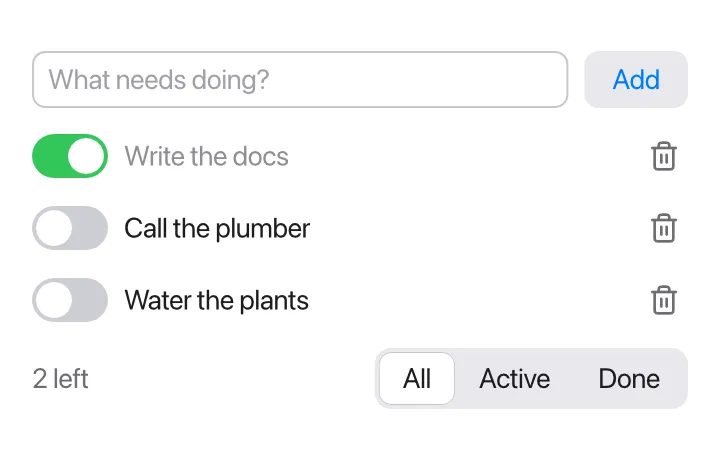
A few things to notice:
- The loop goes over all of
todos, andif shows(todo)inside it does the filtering, sotodostays bindable (a loop overtodos.filter { … }would give copies). - Deleting goes through
remove(id:), which looks the item up by its id. .id(todo.id)keeps each row’s identity stable when items above it are deleted.